Docker
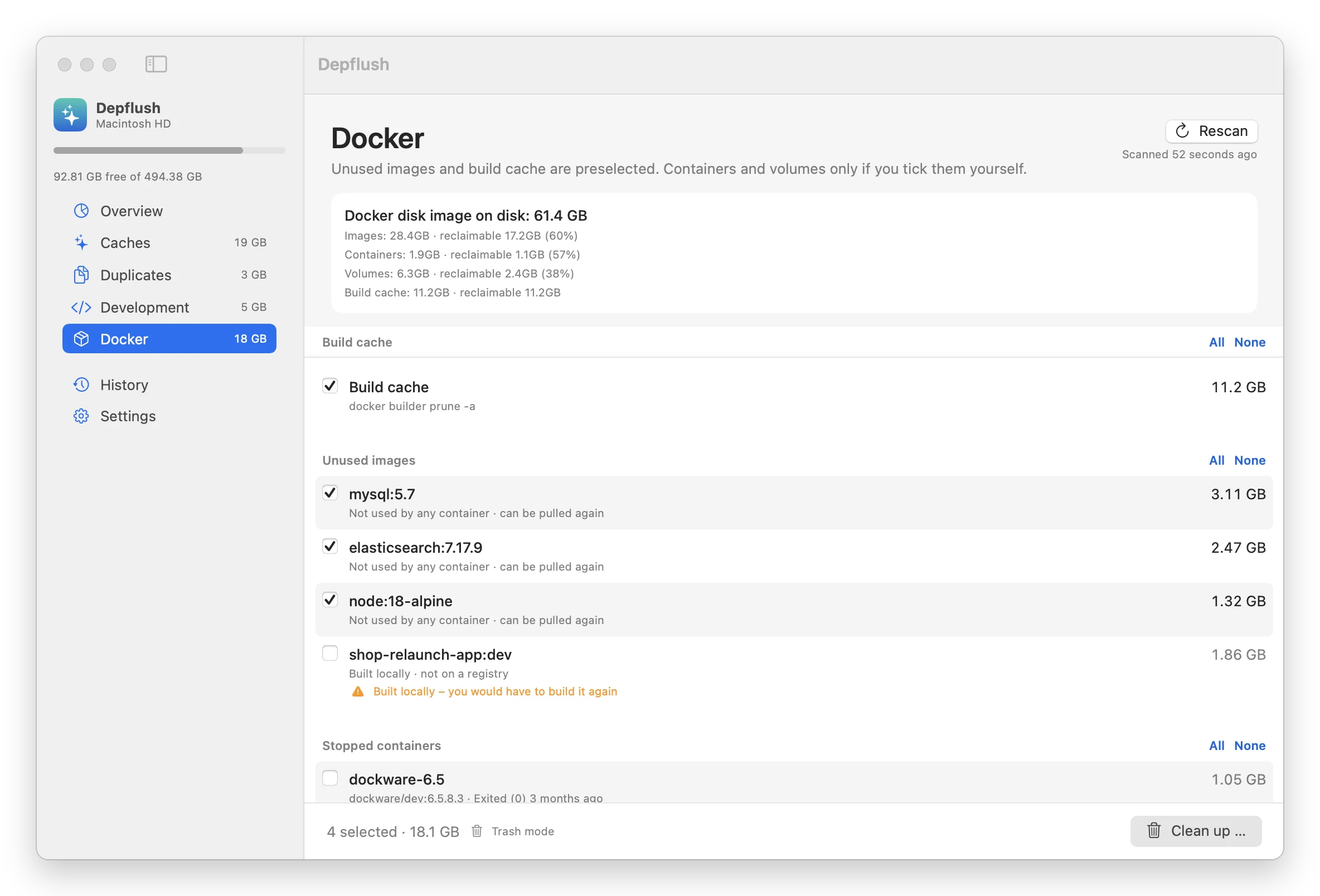
Build cache and images no container uses are preselected when they can be pulled again from a registry. Images you built yourself, stopped containers and orphaned volumes are listed with a warning and stay unticked.
Free Mac app for developers
Depflush finds the gigabytes development leaves behind: Docker images, the vendor and node_modules folders of projects you haven't touched in a year, duplicate SQL dumps and caches from IDE versions you no longer use. You see every item and its size before anything moves.
Version 1.3.1 · macOS 14 or later · Apple Silicon and Intel · Open source (GPL-3.0)
What it finds
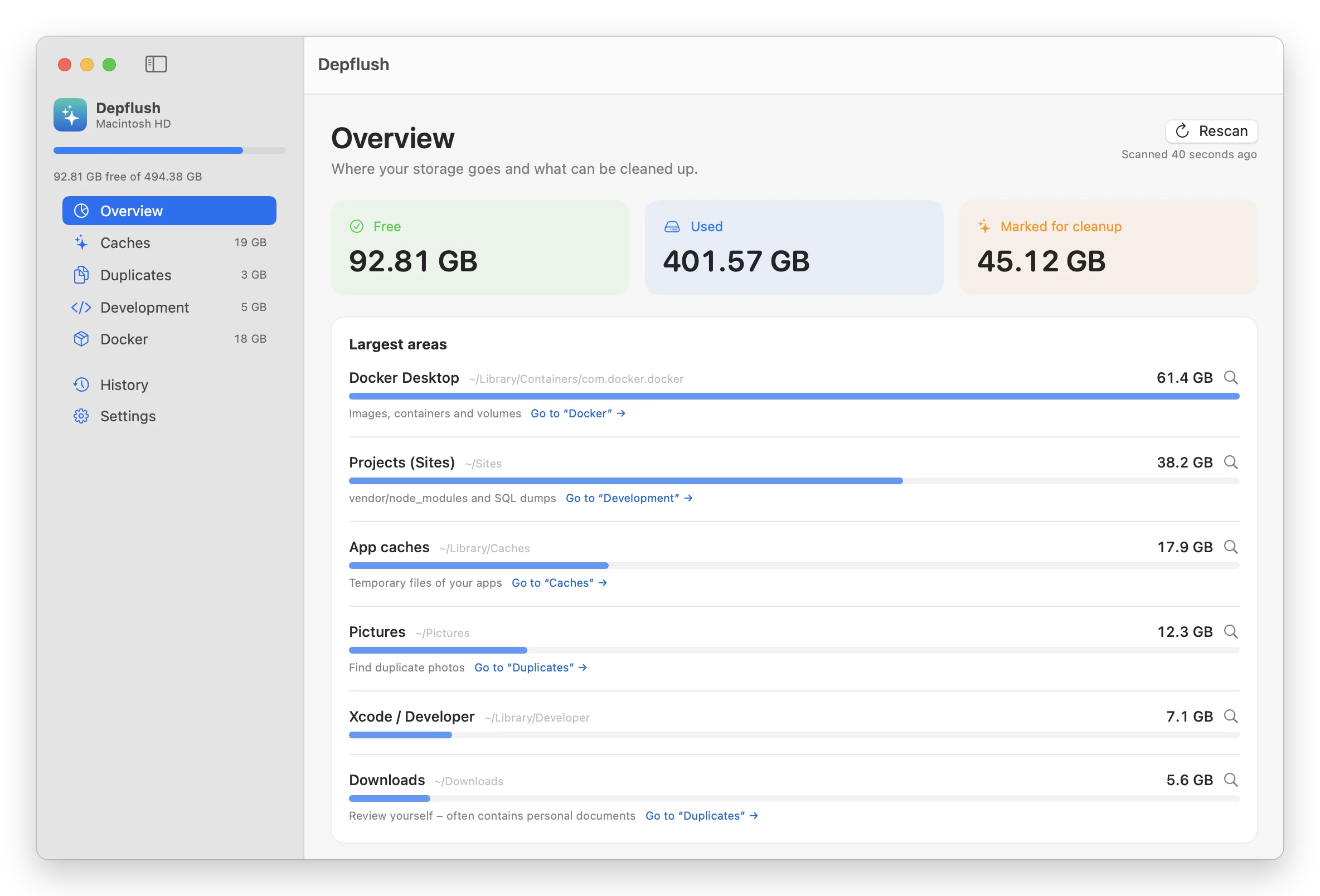
General cleaners look at browser caches and log files. Depflush also reads your projects and your Docker setup, because that is where the big numbers are.
Build cache and images no container uses are preselected when they can be pulled again from a registry. Images you built yourself, stopped containers and orphaned volumes are listed with a warning and stay unticked.
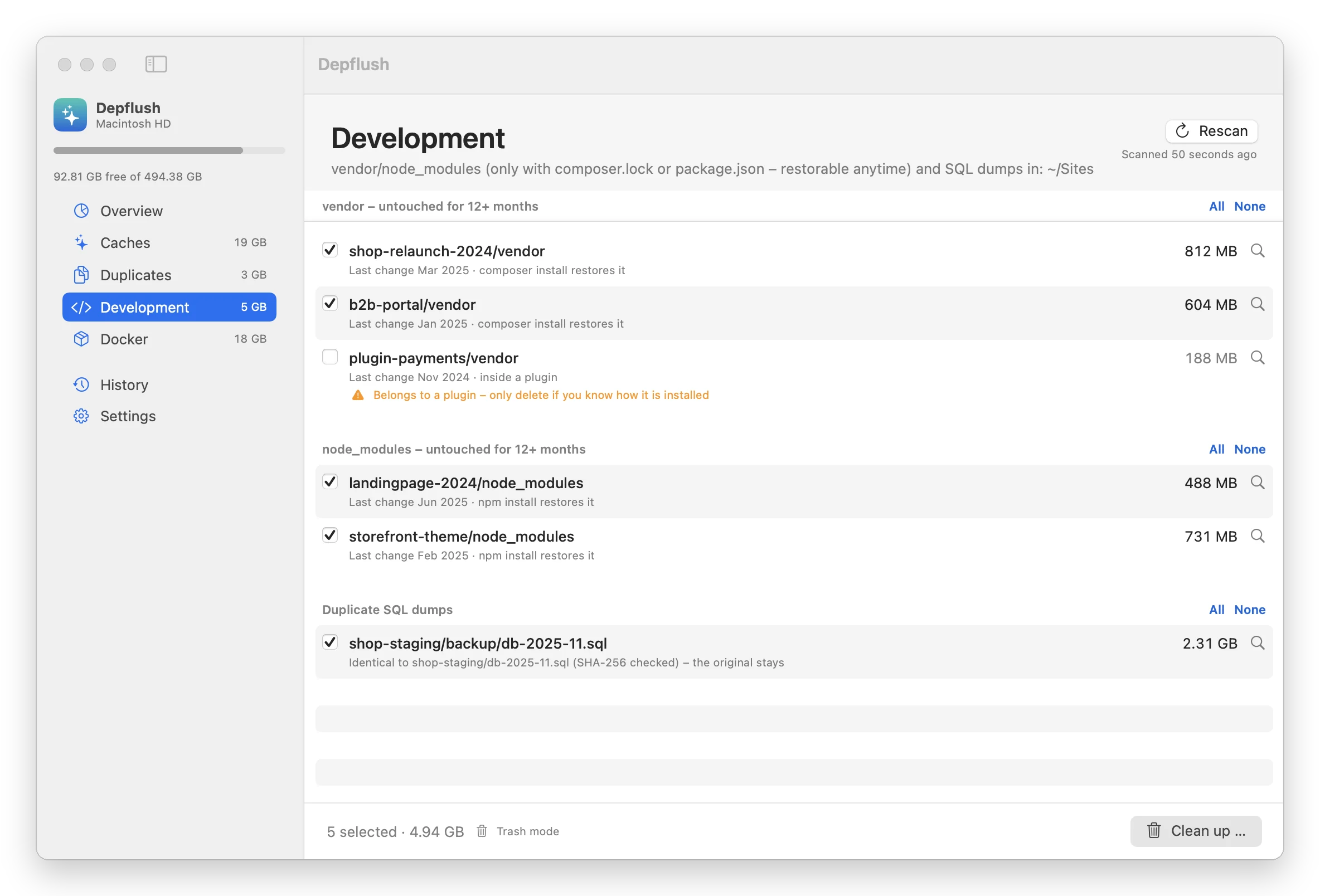
vendor folders next to a composer.lock and node_modules next to a package.json, in projects you haven't changed for 12 months. You choose the threshold. Everything comes back with one command.
Dumps over 100 MB are compared by size, then by SHA-256. Only true copies are preselected, and the original always stays. Large dumps that are not duplicates are shown for you to decide.
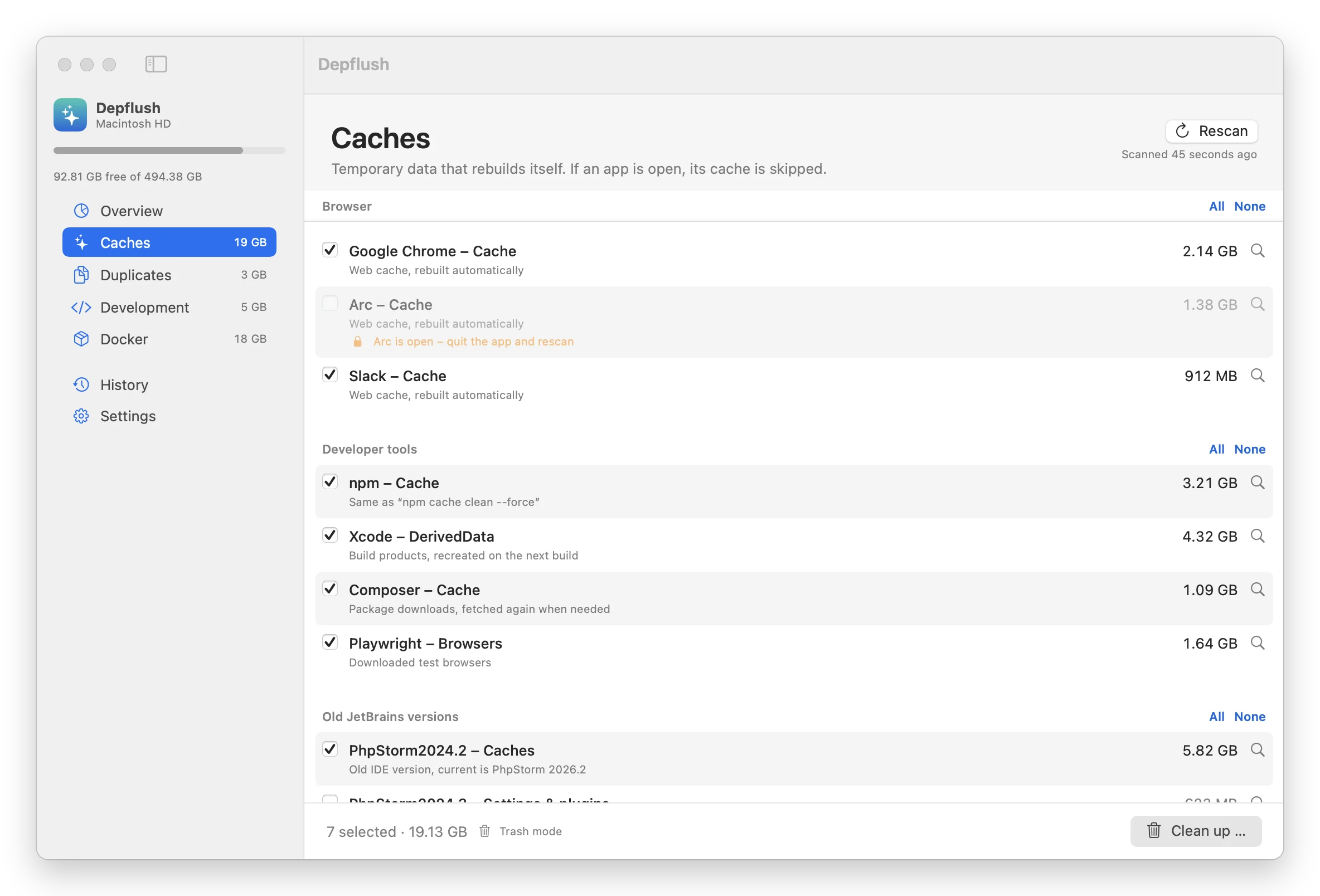
More than 30 cache locations, plus the caches and logs of JetBrains versions you have already upgraded from. The newest version of each IDE is always kept.
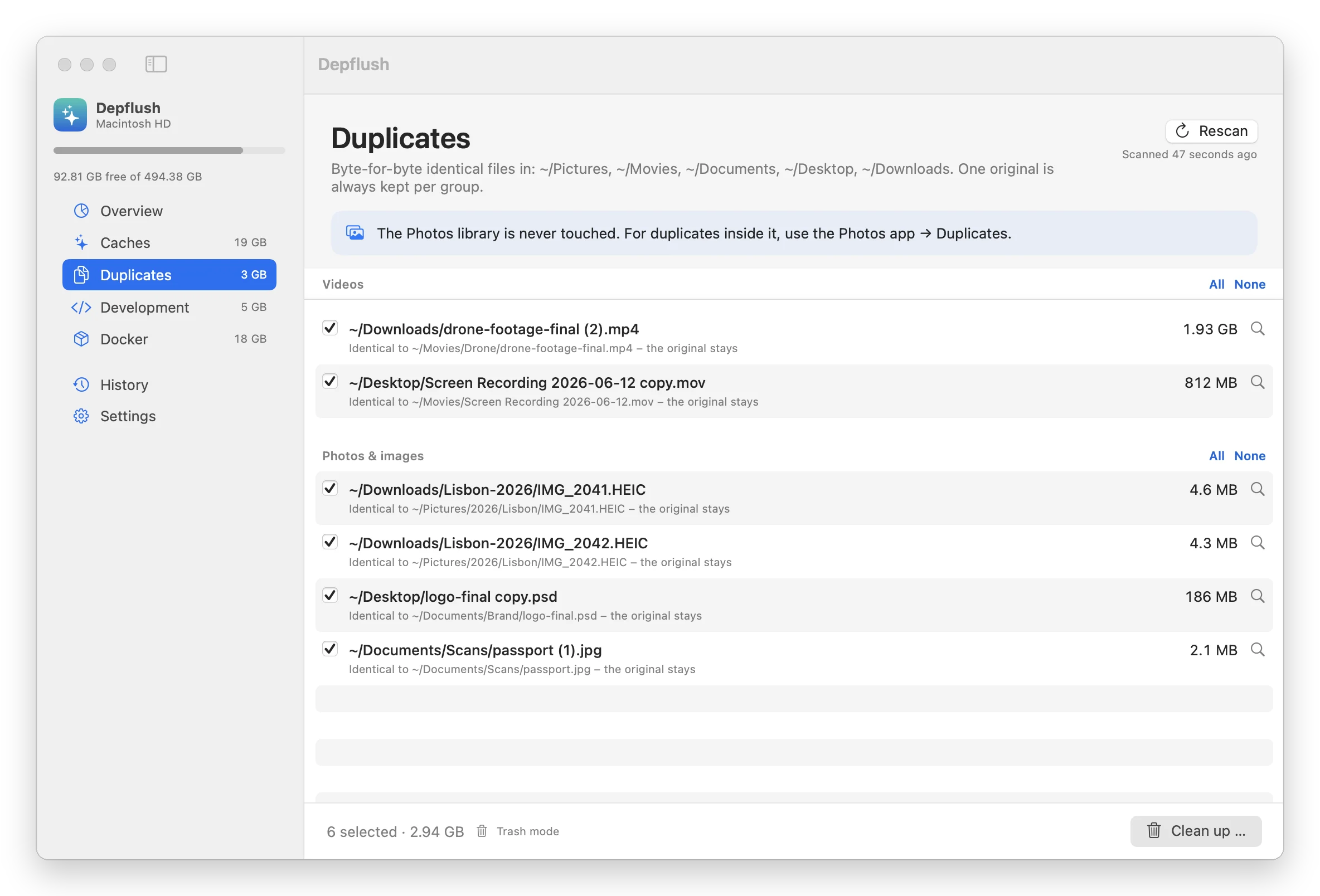
The same photo in Downloads and Pictures, a screen recording copied to the Desktop, a video exported twice. Depflush compares files byte for byte in Pictures, Movies, Documents, Desktop and Downloads, keeps one original and only removes a copy while that original is still there. The Photos library and the working folders of apps such as CapCut or Final Cut are never touched.
Screenshots
Safe items are ticked, anything you might still need is not, and each list says how to get it back. Sample data shown.
Safety
A cleaner that deletes the wrong folder once is never opened again. These rules are built in and cannot be switched off.
Every item is listed with its path and size. You confirm the total before anything happens.
Files go to the Trash, so you can put them back. Switch to permanent deletion in Settings when you want the space right away.
Your home folder, Documents, Desktop, Library and your project folders themselves can never be removed.
If Chrome, Slack or any other app is running, its cache is locked until you quit it.
Containers, volumes, locally built images, plugin dependencies and duplicates inside app folders are shown with a warning and are never preselected.
No account, no analytics, no network calls. The scan and the cleanup run entirely on your machine.
Download
brew install --cask cypriennkeneng/tap/depflushDouble-click the ZIP, then drag Depflush into your Applications folder.
Depflush is not yet notarized by Apple, so macOS asks once. Open the app, then go to System Settings, Privacy & Security, and click “Open Anyway”.
Depflush detects project folders such as ~/Sites, ~/Projects and ~/Developer on its own. Add others in Settings.
Optional: grant Full Disk Access in Settings to see the size of Mail and iPhone backups as well.
Support
Apple charges 99 € a year so that Depflush opens without warnings on every Mac. If the app gave you back a few gigabytes, a coffee helps cover that and the next release.
One-off, any amount, no account needed. Every coffee goes into the Apple developer fee and new features.
Support Depflush on Ko-fiOther ways to help: star the project on GitHub, suggest a cache location, or tell a colleague.
Depflush is made by Web Loupe, a certified Shopware partner in Berlin since 2018. We handle Shopware updates, plugins and performance work for shops and agencies.
Visit webloupe.deGuides
Step-by-step guides for doing it yourself in the Terminal, and an honest comparison with other tools.
What is inside it, and the safe order to get the space back.
Find them, delete them safely, bring them back with one command.
Inside Photos and in your folders, plus two traps that free no space.
What each tool does, what it costs, and when to use which.
FAQ
Depflush is made by Web Loupe, a certified Shopware partner in Berlin. We built it for our own Macs, which fill up with Docker images, client projects and database dumps. If it saves you an afternoon, you can buy us a coffee, and if you ever need help with Shopware, you know where to find us.
Yes. Depflush is open source under the GPL-3.0 license. The code is on GitHub, including the exact rules for what it finds and what it never touches. New cache locations are the easiest way to contribute.
No. There is no account, no analytics and no crash reporting. The app only reads file sizes on your Mac and talks to your local Docker installation.
By default everything goes to the Trash, so you can put it back from there. Dependencies come back with composer install or npm install, and images from a registry with docker pull. The History tab shows what was removed and when.
It looks for common locations such as ~/Sites, ~/Projects, ~/Developer, ~/code and ~/workspace. You can add or remove folders in Settings. A project counts as dormant when none of its own files changed for 12 months; vendor, node_modules, var and .git are ignored for that check.
Depflush asks Docker itself which images and volumes are in use. That is the only safe way to know. If Docker is stopped, the app offers to start it.
Yes, since version 1.3. It compares photos and videos in Pictures, Movies, Documents, Desktop and Downloads byte for byte, so only true copies are listed, never similar-looking pictures. Settings lets you add folders or include all files from 1 MB. Duplicates inside the Photos library are left to the Photos app, which has its own Duplicates album.
Apple charges developers 99 € a year to notarize apps, and Depflush is not notarized yet. The code is public and the build script is ready for it; a coffee gets us there faster. Until then, open the app once, go to System Settings, Privacy & Security, and click “Open Anyway”.
General cleaners are built for everyone and mostly look at system caches. Depflush focuses on what developers accumulate: Docker, dependencies of dormant projects, SQL dumps and old IDE versions, plus duplicate photos and videos. It happily runs next to a general cleaner.
Changelog
1.3.14 Oct 2026
1.3.025 Sep 2026
1.2.024 Sep 2026
1.1.024 Sep 2026
1.0.023 Sep 2026
Web Loupe, Berlin. Vollständige Angaben im Impressum von webloupe.de.
Die Website setzt keine Cookies, nutzt keine Analyse- oder Trackingdienste und bindet keine Inhalte von Drittanbietern ein. Schriften werden vom eigenen Server geladen. Beim Aufruf verarbeitet der Hosting-Anbieter ALL-INKL.COM – Neue Medien Münnich, Hauptstraße 68, 02742 Friedersdorf, Deutschland, technisch notwendige Daten wie IP-Adresse, Zeitpunkt, aufgerufene Seite und Browsertyp in Server-Logdateien. Rechtsgrundlage ist Art. 6 Abs. 1 lit. f DSGVO; unser berechtigtes Interesse ist der sichere und stabile Betrieb der Website. Mit dem Hosting-Anbieter besteht ein Vertrag zur Auftragsverarbeitung nach Art. 28 DSGVO.
Depflush arbeitet ausschließlich lokal auf Ihrem Mac. Die App erhebt keine personenbezogenen Daten und überträgt keine Daten an uns oder an Dritte.
Sie haben das Recht auf Auskunft, Berichtigung, Löschung, Einschränkung der Verarbeitung, Datenübertragbarkeit und Widerspruch sowie das Recht, sich bei einer Datenschutz-Aufsichtsbehörde zu beschweren.